
Table of Contents
- Understanding IT Downtime and Its Financial Impact
- How to Calculate IT Downtime Costs for Your Business
- Proactive IT Maintenance Best Practices to Prevent Outages
- Implementing Network Monitoring Tools for Early Detection
- Building a Disaster Recovery Plan for Small Business
- Reducing Mean Time to Repair and Recovery
- Measuring Success: Uptime, Availability, and ROI
- Frequently Asked Questions
Last Updated: October 18, 2026
Understanding IT Downtime and Its Financial Impact
Unplanned downtime hits small businesses hard. When your systems go down, revenue stops flowing. Customers can’t reach you. Work stalls. The financial damage extends far beyond the moment the outage happens. Proactive measures for reducing system downtime remain essential for maintaining operational continuity in specialized environments where every second of connectivity is critical to patient care.
At Marchese Computer Products, Inc., we’ve helped hundreds of small businesses across Western New York understand the true cost of downtime, and more importantly, how to reduce IT downtime costs. The impact breaks into two categories: direct costs you see immediately, and hidden costs that quietly drain your bottom line.
Direct Costs of Unplanned Downtime
Direct costs are straightforward. Your business stops producing revenue during an outage. Your team sits idle. If you run a service business, you lose billable hours. If you sell products online, every minute offline is lost sales.
Lost production is the most obvious direct cost. A manufacturing facility can’t run machines. A call center can’t process calls. An e-commerce store can’t process orders. The revenue loss is immediate and measurable.
Labor costs pile up too. Your staff still shows up. They still need to be paid. But they can’t work. In some cases, you need extra people working overtime to fix the problem or catch up afterward.
Hidden and Indirect Costs
Hidden costs are where most businesses get blindsided. These expenses don’t show up on a single invoice, but they add up fast.
Customer dissatisfaction is real. Customers who experience downtime lose trust. They may switch to competitors.
Reputational damage spreads quickly. Bad news travels fast, especially online. One unhappy customer tells others. Your brand takes a hit. Recovery takes months.
Data integrity issues emerge too. If systems crash during transactions, data can corrupt. Fixing corrupted data costs time and money.
Compliance violations can trigger fines. If your downtime violates service level agreements with clients, you owe penalties. Regulated industries face even steeper consequences.
Employee stress and burnout spike. Your team works frantically to restore systems. This creates stress that lingers. Stressed employees make mistakes.
How to Calculate IT Downtime Costs for Your Business
Knowing your downtime cost per minute is critical. It drives every decision about prevention and recovery investments. The calculation is simpler than you might think.
Step 1: Identify Your Cost Variables
Start by listing what costs money when systems are down. Think in terms of your specific business.
Revenue loss per hour: How much revenue does your business generate per hour? For a retail store, this might be average hourly sales. For a service business, calculate billable hours.
Labor cost per hour: Add up the fully loaded hourly cost of all staff affected by downtime. Include salary, benefits, taxes, and overhead.
Operational costs: Some costs continue even during downtime. If you pay for server hosting, that bill doesn’t stop. If you have service contracts that require credits during outages, include those.
Customer acquisition cost: How much does it cost to replace a lost customer?
Regulatory or contractual penalties: Do you have SLAs (service level agreements) that trigger fines? Do regulations impose penalties? Include those.
Step 2: Calculate Cost Per Minute of Downtime
Take your hourly costs and divide by 60. This gives you cost per minute.
Example for a small business:
- Revenue loss: $2,000 per hour
- Labor costs: $150 per hour
- Operational costs: $50 per hour
- Total: $2,200 per hour
Divided by 60 minutes: $36.67 per minute of downtime
A one-hour outage costs this business $2,200. A four-hour outage costs $8,800. An eight-hour outage costs $17,600.
Step 3: Track Historical Downtime Events
Look back at your last year of operations. How many outages did you have? How long did each one last?
If you had five outages averaging 45 minutes each, that’s 225 minutes of downtime. At $36.67 per minute, your downtime cost you roughly $8,250 last year.
This number becomes your baseline. It’s the cost of doing nothing. Every dollar you invest in prevention should be compared against this baseline.
Proactive IT Maintenance Best Practices to Prevent Outages
Prevention is always cheaper than recovery.
Preventive Maintenance vs. Predictive Maintenance
Preventive maintenance follows a schedule. You replace components before they fail. You update software on a regular cycle. You clean cooling systems quarterly.
This approach works well for predictable wear. It reduces failures. But it can be inefficient. You might replace a component that still has years of life left.
Predictive maintenance uses monitoring to predict failures. Sensors track temperature, vibration, and performance. Software analyzes the data. When a component shows signs of stress, you replace it.
Predictive maintenance is more efficient. You replace components only when needed. But it requires investment in monitoring tools and expertise to interpret the data.
For most small businesses, a hybrid approach works best. Use preventive maintenance for critical systems. Use predictive monitoring for expensive components.
Condition Monitoring and Real-Time Visibility
Real-time visibility into your IT systems is essential. You need to see problems before they become outages.
Monitoring tools track:
- Server health and resource usage
- Network traffic and bandwidth
- Application performance
- Backup completion status
- Security events and threats
When a metric approaches a warning threshold, alerts notify your team. A disk filling up? Alert. CPU usage spiking? Alert. A backup failing? Alert.
The key is acting on alerts before they trigger an outage. A full disk becomes an outage if ignored. Caught early, it’s a quick fix.
Implementing Network Monitoring Tools for Early Detection
Network monitoring tools are the foundation of downtime prevention. They give you visibility into what’s happening across your infrastructure.
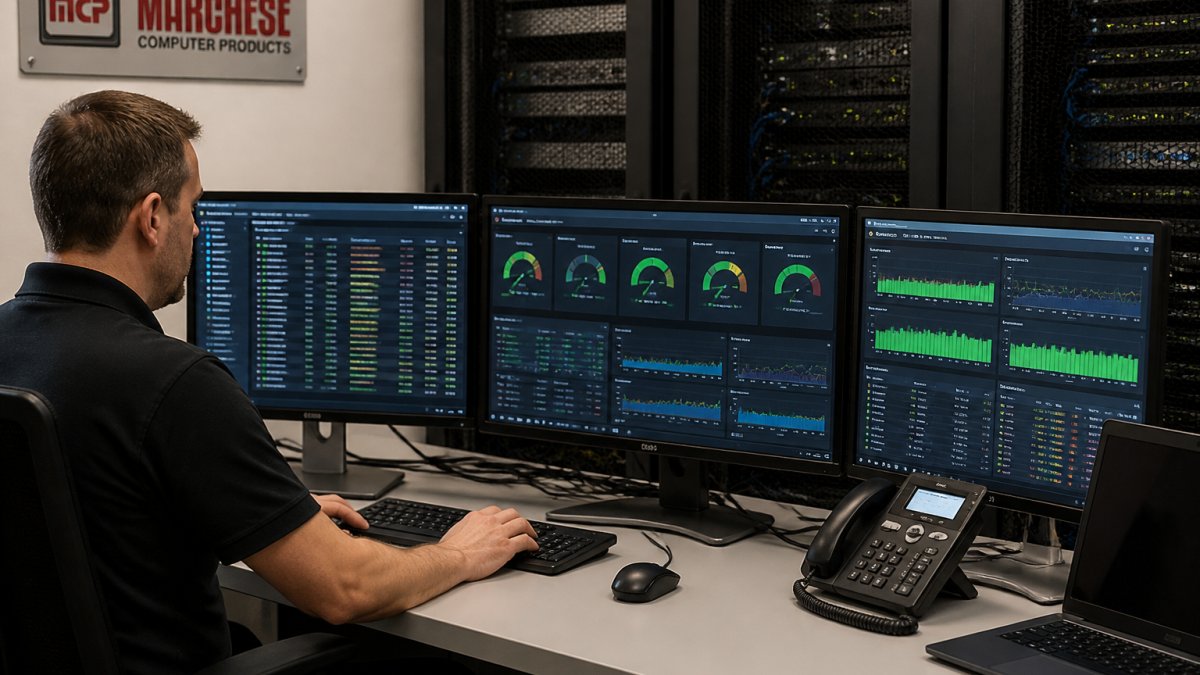
What to Look for in Monitoring Solutions
A good monitoring tool should track your specific infrastructure. If you use cloud services, it should monitor those. If you have on-premise servers, it should monitor those too.
Look for:
- Multi-platform support: Windows, Linux, cloud services, network devices
- Customizable alerts: You set thresholds. You choose notification methods.
- Historical data: See trends over time. Identify patterns that lead to problems.
- Easy integration: It should work with your existing tools without complex setup.
- Affordable pricing: Cost should scale with your business size.
Setting Up Alerts and Response Protocols
Alerts are only useful if someone responds. Create a clear protocol for handling alerts.
Define alert severity levels:
- Critical: Immediate action needed. System is down or about to go down.
- Warning: Investigate soon. A problem is developing.
- Info: Track for patterns. No immediate action needed.
Assign responsibility. Who gets notified for each type of alert? What’s the response time expectation? Critical alerts might need a 15-minute response. Warnings might get a 2-hour response window.
Document the response procedure. When a disk is full, what’s the first step? When CPU usage spikes, what do you check? Having a documented playbook speeds up response.
Building a Disaster Recovery Plan for Small Business
A disaster recovery plan is your insurance policy. It defines how you’ll restore systems if something catastrophic happens.
Define Your RTO and RPO
RTO (Recovery Time Objective) is how long you can afford to be down. For a critical system, this might be 1 hour. For a less critical system, it might be 8 hours.
RPO (Recovery Point Objective) is how much data you can afford to lose. If your RPO is 1 hour, you need backups every hour. If your RPO is 24 hours, daily backups are sufficient.
These numbers drive your recovery strategy. A 1-hour RTO requires redundancy and failover capability. A 24-hour RTO might only need regular backups.
Document Critical Systems and Dependencies
List every system your business depends on. Rank them by criticality.
Tier 1: Systems that must be restored first. Your business can’t function without them.
Tier 2: Systems that should be restored within a few hours.
Tier 3: Systems that can wait until normal business hours to restore.
Document dependencies. Does your accounting system depend on your network? Does your e-commerce platform depend on your payment processor? Understanding these connections helps you prioritize recovery.
Test and Update Your Plan Regularly
A disaster recovery plan that’s never tested is just a document gathering dust. Test it quarterly.
Run tabletop exercises. Walk through a scenario. Does your team know what to do? Are contact numbers current? Are passwords accessible to the right people?
Test actual recovery. Can you restore from backup? How long does it take? Do you meet your RTO?
Update the plan when things change. New systems. New staff. New vendors. Your plan should reflect your current reality.
Reducing Mean Time to Repair and Recovery
MTTR (Mean Time to Repair) is how long it takes to fix a problem. Reducing MTTR is critical. Every minute of downtime costs money.
Incident Response Playbooks and Communication
Create written playbooks for common problems. When a server goes down, what are the first five steps? When a network connection fails, what do you check?
Clear communication prevents confusion. Designate who communicates with customers during an outage. What message do they send? When do they send updates?
A communication plan might look like:
- Within 15 minutes: Acknowledge the issue to customers
- Every 30 minutes: Provide a status update
- Upon resolution: Notify all affected parties
- Within 24 hours: Send a root cause analysis
Critical Spare Parts and Asset Management
Keep critical spare parts in stock. If a hard drive fails, can you replace it immediately? If a network switch fails, do you have a backup?
Maintain an asset inventory. Know what hardware you have. Know when it was installed. Know when it’s likely to fail based on age.
Partner with vendors who offer fast replacement. Some vendors offer next-business-day replacement for critical components. This reduces MTTR dramatically.
Measuring Success: Uptime, Availability, and ROI
Track metrics that matter. Uptime percentage tells you reliability. ROI on prevention investments tells you if your strategy is working.
Uptime percentage is calculated as: (Total Time – Downtime) / Total Time × 100
A 99% uptime means 3.65 days of downtime per year. A 99.9% uptime means 8.76 hours per year.
Availability factors in planned maintenance. You might have 99% uptime but 95% availability if you schedule maintenance during business hours. Availability is a better measure of customer experience.
Track the ROI of your prevention investments. If you spent $5,000 on monitoring tools and prevented a $20,000 outage, your ROI is 400%.
The cost of IT downtime extends far beyond the moment systems go offline. Hidden costs like customer churn, reputational damage, and compliance violations can exceed direct losses.
Gartner’s 2026 Infrastructure and Operations Report
Forrester’s Business Resilience Research
Frequently Asked Questions
How do you calculate the cost of IT downtime?
Start by identifying all costs during an outage: lost revenue per minute, employee salaries during idle time, and customer impact. Multiply your cost per minute by the duration of downtime to get the total. Track historical incidents to establish a baseline and forecast future expenses.
What are the most common causes of IT downtime?
Hardware failures, software bugs, network outages, human error, and cybersecurity incidents are the leading causes. Environmental factors like power surges and cooling failures also trigger unplanned downtime. Many small businesses don’t realize that third-party cloud service outages and dependency failures can impact their operations even when their own systems are functioning. Identifying your specific vulnerabilities helps prioritize prevention efforts.
How can proactive IT maintenance prevent downtime?
Proactive maintenance includes regular software updates, hardware health checks, and condition monitoring before failures occur. Predictive maintenance uses real-time data to identify equipment stress before it breaks. Preventive maintenance follows a scheduled approach to replace components at optimal intervals. Together, these strategies catch issues early, extend equipment life, and reduce the likelihood of costly emergency repairs and unplanned outages that disrupt operations.
What should a disaster recovery plan include for a small business?
A solid disaster recovery plan defines your Recovery Time Objective (RTO) and Recovery Point Objective (RPO), documents all critical systems and dependencies, identifies backup and failover procedures, and includes a communication protocol for staff and customers. It should also specify roles and responsibilities during an incident, list contact information for key personnel, and outline testing schedules. Regular testing ensures the plan works when you need it and identifies gaps before a real emergency.